During the 2012-2013 winter season, Zone4 began rolling out the idea of using the "Club Registration System" for race registrations that had previously been handled by the built in registration system of the PC based Zone4 Race Timing application. The Club Registration system offers a number of advantages over the older system including:
-
Ability to edit registration forms after they have become live.
-
More flexibility in registration form design including easier setup with a wider array of field types, html editors on text blocks, unlimited logos and images, Display Date settings on specific fields, per-option and per-field quantity limits, and more flexible Discount Code field.
-
Access to features such as custom Confirmation Lists (http://www.zone4.ca/News.asp?ID=75), customized receipts, and live custom reports.
-
Ability for admin to edit registration data live so that confirmation list and other reports reflected most current registration data.
-
For clubs with own merchant account, access to features such as Conditional Display Logic, Tax rate, and Taxable fee fields through the newer Version 2 of the Club Registration System.
-
Ability to download registration data into the Race File format (.rac) for use with the PC based Zone4 Race Timing application.
There were a few downsides of this approach for races last year and Zone4 has been working to address these. The following upgrades have recently been made to the Club Registration system to improve it's effectiveness for races and employ some new powerful features.
-
All new registrations are being automatically upgrade to Version 2 even for clubs who are using Zone4's merchant account for transactions. This gives all registrations access to Conditional Display Logic (details here: http://www.zone4.ca/News.asp?ID=68), Tax rate feature, Taxable fee fields, and better bilingual support thanks to the generous translation work done by Michel Lamontagne of Club Cycliste Mont Sainte-Anne in Quebec.
-
Age and Gender based option filtering has been added to greatly reduce the number of registration errors and the need to people to be familiar with what age ranges different categories such as Juvenile, Midget, Junior, etc apply to. Full details of this new feature can be found here: http://www.zone4.ca/News.asp?ID=79
-
Preset Fields for Club, Team, Age, CCC Licence, FIS Licence, UCI Licence and Bib Pickup. These Preset Fields pre-fill from registrants stored QuickList values making entry much quicker. It also allowed us to add a set of live lookup and validation routines to provide more data consistency in Club and Team fields and help clean-up incorrect licence data at time of registration. The following routines are now applied when the CCCLicence, BirthDate, and Club and Team fields are added to a registration:
-
When a registrant enters their Firstname, Lastname, and Year of Birth (via the Birth Date field), we look up their corresponding information in the CCC Skiers database and fill in the CCC Licence, FIS Licence, Gender, Club, and Team information (which are all classified as 'public' fields by CCC.)
-
If a registrant's information is pre-filled from a stored Quicklist entry, we look up their CCC information based on their pre-filled Firstname, Lastname, and Year of Birth and if their pre-filled Licence, Gender, Club, or Team doesn't match the information in the CCC skier's database we correct the stored information with the validated CCC information.
-
If the registrant has a CCC Licence that is not valid for the current year, we prompt them to renew it and provide a link to the CCC renewal form.
-
If there is no unique match found in the CCC skiers database for a given Firstname, Lastname, and Year of birth, we present the registrant with a list of official validated club and team names to choose from (however, we don't prevent the registrant from entering a club name not on the list - such as would be the case for American or International racers).
-
If the registrant has a club or team name stored in their zone4 Quicklist that doesn't match a club or team in our list of valid names, we clear it and prompt them to choose one from the list of official CCC clubs and teams. These new values will update stored Quicklist values so the next time that individual registers, the proper club and team will be used.
-
The Bib Pickup field has registrants choose between "Club" or "Team". This fills out the field with their entered club or team name so that you end up with a concise set of club/team data in a single sortable "Bib Pickup" field. This way you can generate a report grouped by this "Bib Pickup" field in both the Club Registration system as well as in the PC based Zone4 Race Timing application thereby making your bib sorting and handout processes much smoother.
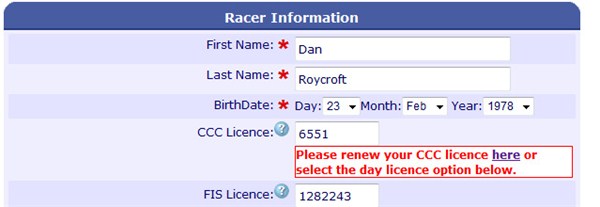
This live validation and lookup functionality will greatly improve the quality and consistency of registrant data and make the job of race secretaries much easier.
As the data must still be transferred to the PC based based Zone4 Timing application, the following guidelines should be considered when setting up race registrations in the Club Registration System.
-
For each day of racing, setup a new "Single Choice Fee Group" field. Add your Category names and prices as options.
-
Keep your Category Names less than 20 characters so no changes are required when you download the data into Zone4's timing application.
-
Use the Preset fields instead of setting up your own Text Boxes for things like Club, Team, and Licences. Our validation and Quicklist pre-fill functions only work on Preset fields.
We will be continuing to work on upgrades to the Club Registration system to continue our goal of making the job of managing and timing races easier for all of our clubs.
Sincerely, Zone4 Team
|

 Club Registration System Upgrades for Race Organizers